Now connect as you travel with WiFi enabled railway stations in India. Indian Railways is evolving at a fast pace by putting passengers first when it comes to priorities and convenience. With more and more rail terminals being covered by the WiFi network in separate phases, at present, 10 railway stations are going live with the facility of Internet services.
Starting with Mumbai, WiFi enabled railway stations in India now include 9 more stations, viz., Bhopal, Raipur, Bhubaneshwar, Pune, Ranchi, Vijayawada, Kachiguda, Ernakulam, and Visakhapatnam.
Millions of smartphone users in India use Internet technology today. The use of Internet has expanded to booking tickets online, sharing information and personal updates with family and friends via social platforms like Facebook and Twitter, etc. Hence, WiFi enabled railway stations can ensure that the commuters stay connected to their social platforms more easily.
The best part about the wireless Internet facility is that you can book train tickets, cabs from railway stations, hotel rooms, etc. on the go. You can also check for train running status and PNR confirmation at the station itself.
Wondering how to connect your smartphone to the WiFi at these railway stations? Below is the step-by-step guide to help you out on this:
Step 1
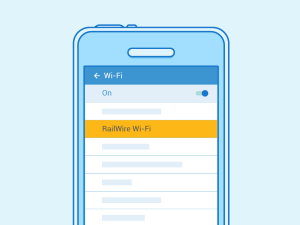
All you have to do is to select the Railwire network in your device's WiFi settings.
Step 2
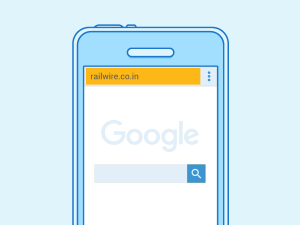
Once selected the same, open your browser and enter "railwire.co.in" (URL of the railways) into the window.
Step 3
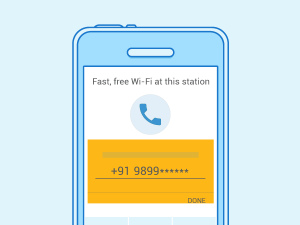
You will then be directed to the login screen where you can enter your phone number and click on "receive SMS".
Step 4
A 4-digit OTP code will be sent to you in SMS. Just fill up the code in the WiFi login and click "done".
Step 5
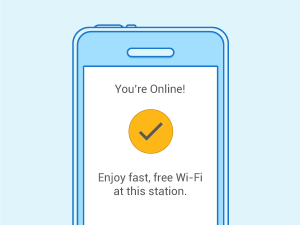
You can then see a checkmark that'll let you know that you are connected to fast, free WiFi.
Watch a video, play your favourite game or simply download a book as these 5 steps to connect to free WiFi are quite useful. WiFi, High Five!
Now as you know the steps to how to avail Internet facility at the WiFi enabled railway stations in India, stay connected to your world while travelling. Looks like the heydays of travelling by train are making a return with a panache. Thanks to the Indian Railways. Travel more!